> For the complete documentation index, see [llms.txt](https://kermitcloud.gitbook.io/kermitcloud-hosting-wiki/llms.txt). Markdown versions of documentation pages are available by appending `.md` to page URLs; this page is available as [Markdown](https://kermitcloud.gitbook.io/kermitcloud-hosting-wiki/minecraft-plugins/plugins/ajparkour.md).
# ajParkour
### What does it do?[](https://docs.bloom.host/plugins/ajparkour#what-does-it-do)
[ajParkour](https://www.spigotmc.org/resources/ajparkour-rewards-1-7-10-1-18-x-mysql-storage-option.60909/) automatically generates parkour courses on the fly, below your players feet.
### Installation[](https://docs.bloom.host/plugins/ajparkour#installation)
#### Plugin installer[](https://docs.bloom.host/plugins/ajparkour#plugin-installer)
It is quite simple to install plugins from the plugin installer, firstly search for the plugin.
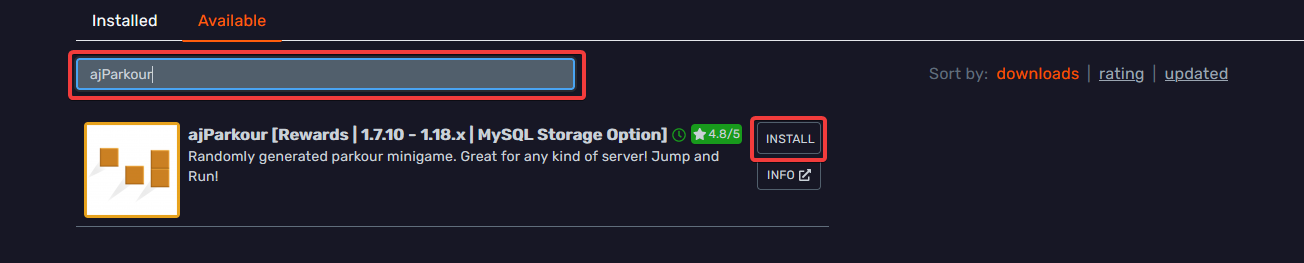 Then click install and restart your server.
#### Manual[](https://docs.bloom.host/plugins/ajparkour#manual)
Download the plugin from [spigot](https://www.spigotmc.org/resources/ajparkour-rewards-1-7-10-1-18-x-mysql-storage-option.60909/) and place it in your `plugins` folder. Then just restart your server!
### Configuration[](https://docs.bloom.host/plugins/ajparkour#configuration)
Firstly, you need to give your area a name, for this we will use "BloomDocs" so we run `/ajp setup create BloomDocs`
Next we need to setup the areas our random blocks will spawn in. To do that we have two options, Worldedit or vanilla.
#### Worldedit[](https://docs.bloom.host/plugins/ajparkour#worldedit)
caution
[WorldEdit](https://dev.bukkit.org/projects/worldedit) must be installed for this to work, if you don't have it installed, use the method below
Using [WorldEdit](https://dev.bukkit.org/projects/worldedit) is the easiest option, All you need to do is create a selection with the wand ( `//wand` ) or `//pos1` and `//pos2`. after that you run `/ajp setup we` and it will do the rest!
#### Vanilla[](https://docs.bloom.host/plugins/ajparkour#vanilla)
ajParkour has another method built in using `/ajp setup pos1` for one corner and `/ajp setup pos2` for the other.
#### Difficulty[](https://docs.bloom.host/plugins/ajparkour#difficulty)
The next thing to setup is difficulty, there are 5 options, described below.
* Easy - The easiest with only one block jumps
* Medium - Adds two and three block jumps
* Hard - Adds four block jumps
* Balanced - Slowly increases the difficulty the more you progress
To set the difficulty you run `/ajp setup difficulty ` with difficulty from the above list.
#### Fall Position[](https://docs.bloom.host/plugins/ajparkour#fall-position)
When you fall you can optionally configure ajParkour to send you back to a predefined location, this is achieved by running `/ajp setup fallpos` while standing on the location you want it set to - this preserves rotation too.
#### Saving[](https://docs.bloom.host/plugins/ajparkour#saving)
Once you have completed the former steps, you can save your configuration to be joined using `/ajp setup save`.
#### Editing[](https://docs.bloom.host/plugins/ajparkour#editing)
If you want to edit your setup at any later point you can run `/ajp edit ` with name being the name of the area with capitalization.
### Joining[](https://docs.bloom.host/plugins/ajparkour#joining)
Now you have created your course you can join it via `/ajp start ` with player being the player name and course the name you gave it
### Portals[](https://docs.bloom.host/plugins/ajparkour#portals)
Typing commands is hard for players... Lets make some portals to join out course!
Stand where you would like your portal and run `/ajp portals create `. A good name would be the name of you course with `_portal` on the end
Then click install and restart your server.
#### Manual[](https://docs.bloom.host/plugins/ajparkour#manual)
Download the plugin from [spigot](https://www.spigotmc.org/resources/ajparkour-rewards-1-7-10-1-18-x-mysql-storage-option.60909/) and place it in your `plugins` folder. Then just restart your server!
### Configuration[](https://docs.bloom.host/plugins/ajparkour#configuration)
Firstly, you need to give your area a name, for this we will use "BloomDocs" so we run `/ajp setup create BloomDocs`
Next we need to setup the areas our random blocks will spawn in. To do that we have two options, Worldedit or vanilla.
#### Worldedit[](https://docs.bloom.host/plugins/ajparkour#worldedit)
caution
[WorldEdit](https://dev.bukkit.org/projects/worldedit) must be installed for this to work, if you don't have it installed, use the method below
Using [WorldEdit](https://dev.bukkit.org/projects/worldedit) is the easiest option, All you need to do is create a selection with the wand ( `//wand` ) or `//pos1` and `//pos2`. after that you run `/ajp setup we` and it will do the rest!
#### Vanilla[](https://docs.bloom.host/plugins/ajparkour#vanilla)
ajParkour has another method built in using `/ajp setup pos1` for one corner and `/ajp setup pos2` for the other.
#### Difficulty[](https://docs.bloom.host/plugins/ajparkour#difficulty)
The next thing to setup is difficulty, there are 5 options, described below.
* Easy - The easiest with only one block jumps
* Medium - Adds two and three block jumps
* Hard - Adds four block jumps
* Balanced - Slowly increases the difficulty the more you progress
To set the difficulty you run `/ajp setup difficulty ` with difficulty from the above list.
#### Fall Position[](https://docs.bloom.host/plugins/ajparkour#fall-position)
When you fall you can optionally configure ajParkour to send you back to a predefined location, this is achieved by running `/ajp setup fallpos` while standing on the location you want it set to - this preserves rotation too.
#### Saving[](https://docs.bloom.host/plugins/ajparkour#saving)
Once you have completed the former steps, you can save your configuration to be joined using `/ajp setup save`.
#### Editing[](https://docs.bloom.host/plugins/ajparkour#editing)
If you want to edit your setup at any later point you can run `/ajp edit ` with name being the name of the area with capitalization.
### Joining[](https://docs.bloom.host/plugins/ajparkour#joining)
Now you have created your course you can join it via `/ajp start ` with player being the player name and course the name you gave it
### Portals[](https://docs.bloom.host/plugins/ajparkour#portals)
Typing commands is hard for players... Lets make some portals to join out course!
Stand where you would like your portal and run `/ajp portals create `. A good name would be the name of you course with `_portal` on the end