> For the complete documentation index, see [llms.txt](https://kermitcloud.gitbook.io/kermitcloud-hosting-wiki/llms.txt). Markdown versions of documentation pages are available by appending `.md` to page URLs; this page is available as [Markdown](https://kermitcloud.gitbook.io/kermitcloud-hosting-wiki/running-a-server/server-softwares/forge.md).
# Forge
### Recommended Software:
#### [Paper](https://papermc.io/)
Paper is a [fork](https://en.wikipedia.org/wiki/Fork_\(software_development\)) of Spigot and aims to have better performance and stability. It also has an expanded API, allowing plugins to become even faster. This jar is highly recommended as it fixes exploits, bugs, and more as well as it greatly improves performance and stability of any Minecraft server.\
Paper works with Bukkit and Spigot plugins and is the recommended default jar.
***
### Modded Minecraft:
* Forge
* Fabric
* Neoforge
#### [Forge](https://files.minecraftforge.net/)
Forge is a jar that adds a modding API for developers to tap into. It is much more expansive than Bukkit, as players also have to install mods on their end, allowing for more possibilites. It's recommended for mods and modpacks. Mostly used for older versions of the game. (pre1.12)
***
#### What is Forge?
> Forge is a modding API for Minecraft. Users who download and install Minecraft Forge can install mods (modifications) to Minecraft Instances.
#### Installation
First, navigate to the `Settings` tab and find `Change Server Type`. Once there set up the change server type menu for installing forge.
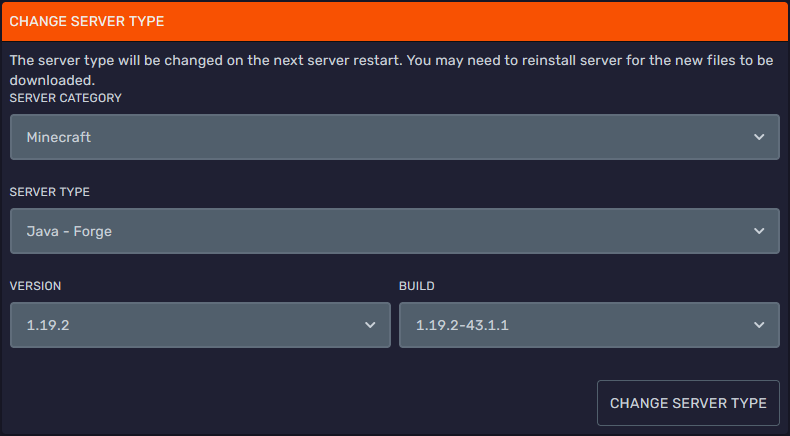 On this menu set version to that required by your mods and build to the latest one available (top of the list).
Once the Change Server Type menu has been configured, press the Change Server Type button, this will prompt you to [make a backup](https://kermitcloud.gitbook.io/kermitcloud-hosting-wiki/minecraft-server/how-to-make-a-backup) and it is advised to do so.
Once the server has started again and finished running the installer you can go on to install mods!
#### Installing Forge Mods
>
> Refer to [this](https://docs.bloom.host/mods-install) guide.
On this menu set version to that required by your mods and build to the latest one available (top of the list).
Once the Change Server Type menu has been configured, press the Change Server Type button, this will prompt you to [make a backup](https://kermitcloud.gitbook.io/kermitcloud-hosting-wiki/minecraft-server/how-to-make-a-backup) and it is advised to do so.
Once the server has started again and finished running the installer you can go on to install mods!
#### Installing Forge Mods
>
> Refer to [this](https://docs.bloom.host/mods-install) guide.