> For the complete documentation index, see [llms.txt](https://kermitcloud.gitbook.io/kermitcloud-hosting-wiki/llms.txt). Markdown versions of documentation pages are available by appending `.md` to page URLs; this page is available as [Markdown](https://kermitcloud.gitbook.io/kermitcloud-hosting-wiki/running-a-server/server-softwares/neoforge.md).
# Neoforge
### Recommended Software:
#### [Paper](https://papermc.io/)
Paper is a [fork](https://en.wikipedia.org/wiki/Fork_\(software_development\)) of Spigot and aims to have better performance and stability. It also has an expanded API, allowing plugins to become even faster. This jar is highly recommended as it fixes exploits, bugs, and more as well as it greatly improves performance and stability of any Minecraft server.\
Paper works with Bukkit and Spigot plugins and is the recommended default jar.
***
### Modded Minecraft:
* Forge
* Fabric
* Neoforge
#### [NeoForge](https://neoforged.net/)
NeoForge is a jar that adds the modding api of Forge, and performance of Fabric. While still being new and becoming widely adopted. Used in modern versions of the game.
***
#### What is Neoforge?
"*Neoforge is a new mod loader that incorperates Neoforge performance and Forge api*"
Mods can be used to modify, remove or even add new content to Minecraft.
#### Installing Neoforge
Go the the `Settings` tab on the panel and on the right side you will see `Change Server Type` box. Edit the boxes to the Neoforge version you would like to use.
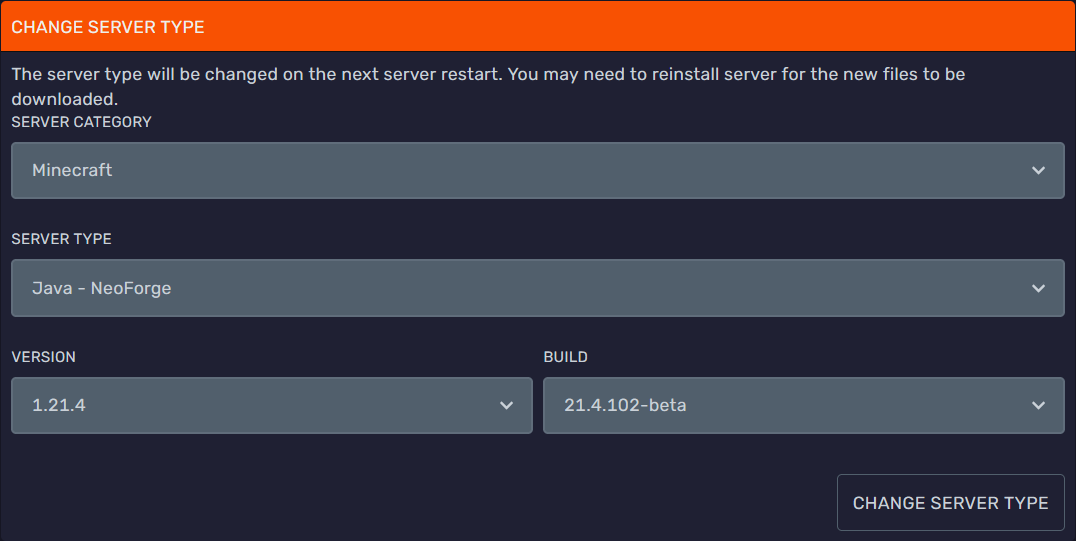 Click `Change Server Type`, this will download Neoforge to your server.
You are now done, you are running a Neoforge server!\
It's a server without mods though, so it's still purely vanilla at this point, keep reading to learn how to install mods.
#### Installing Neoforge Mods
> Refer to [this](https://docs.bloom.host/mods-install) guide.
Click `Change Server Type`, this will download Neoforge to your server.
You are now done, you are running a Neoforge server!\
It's a server without mods though, so it's still purely vanilla at this point, keep reading to learn how to install mods.
#### Installing Neoforge Mods
> Refer to [this](https://docs.bloom.host/mods-install) guide.